


如果你想要快速的建立一個 VPN,這一篇很適合你!
首先你需要一台伺服器,這裡我是使用 Proxmox
Proxmox 可以快速開啟一個虛擬機,並且可以使用 UI 設定硬體配置與網路配置
20 秒內建好一個 Ubuntu server,輕輕鬆鬆
以下圖片及程式碼皆是我實際操作過程中複製與截圖
Ubuntu 23.04 testVPN tty1

testVPN login: root
Password:
Welcome to Ubuntu 23.04 (GNU/Linux 6.8.4-2-pve x86_64)

 * Documentation:  https://help.ubuntu.com
 * Management:     https://landscape.canonical.com
 * Support:        https://ubuntu.com/advantage

The programs included with the Ubuntu system are free software;
the exact distribution terms for each program are described in the
individual files in /usr/share/doc/*/copyright.

Ubuntu comes with ABSOLUTELY NO WARRANTY, to the extent permitted by
applicable law.
安裝步驟
下載別人編寫好的安裝引導 wget https://git.io/vpn -O openvpn-ubuntu-install.sh
--2024-09-24 13:46:18--  https://raw.githubusercontent.com/Nyr/openvpn-install/master/openvpn-install.sh
Resolving raw.githubusercontent.com (raw.githubusercontent.com)... 185.199.110.133, 185.199.109.133, 185.199.108.133, ...
Connecting to raw.githubusercontent.com (raw.githubusercontent.com)|185.199.110.133|:443... connected.
HTTP request sent, awaiting response... 200 OK
Length: 23534 (23K) [text/plain]
Saving to: 'openvpn-ubuntu-install.sh'

openvpn-ubuntu-install 100%[=========================>]  22.98K  --.-KB/s    in 0.01s

2024-09-24 13:46:19 (1.70 MB/s) - 'openvpn-ubuntu-install.sh' saved [23534/23534]

# 這時候會看到多了一個檔案
<strong>root@testVPN:~#</strong> ll
total 52
drwx------  4 root root  4096 Sep 24 13:46 ./
drwxr-xr-x 18 root root  4096 Sep 24 13:43 ../
-rw-r--r--  1 root root  3106 Oct 17  2022 .bashrc
drwx------  2 root root  4096 Sep 24 13:45 .cache/
-rw-r--r--  1 root root   161 Oct 17  2022 .profile
drwx------  2 root root  4096 Jun  8  2023 .ssh/
-rw-r--r--  1 root root   180 Sep 24 13:46 .wget-hsts
-rw-r--r--  1 root root 23534 Sep 24 13:46 openvpn-ubuntu-install.sh
執行下載好的檔案
<strong>root@testVPN:~#</strong> bash openvpn-ubuntu-install.sh

# 如果使用 sh 執行會出現這個錯誤訊息
<strong>root@testVPN:~#</strong> sh openvpn-ubuntu-install.sh
<span style="color: #ff6900;" class="stk-highlight">This installer needs to be run with "bash", not "sh".</span>
PVE TUN Error
如果是使用 proxmox 會出現這個錯誤
<span style="color: #ff6900;" class="stk-highlight">The system does not have the TUN device available.
TUN needs to be enabled before running this installer.</span>
搜尋關鍵字會發現有很多人遇到這個問題,是因為 proxmox 預設不會讓 CT 有底層的權限,
所以我們要進入 terminal 裡面把它打開
先關閉這台虛擬機,接這到 >_命令列 去執行下面的指令修改設定
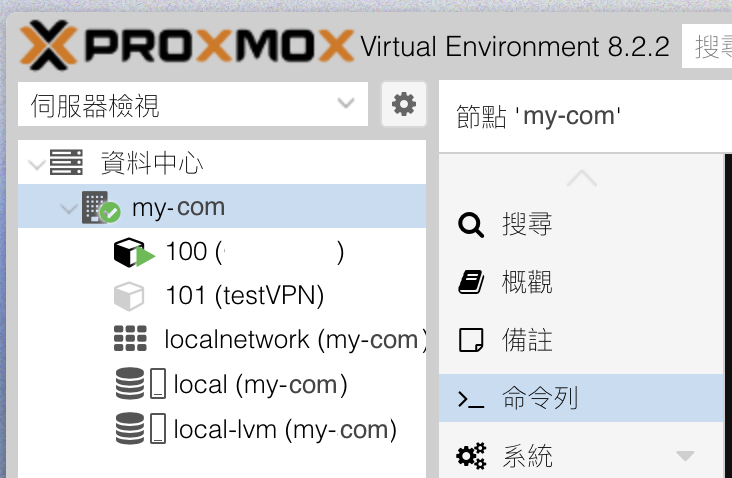
# 可以看到底下有你的 pvc id 相同名稱的設定檔<strong>root@my-com:~#</strong> ls /etc/pve/lxc/
100.conf 101.conf

#修改要執行安裝的 vpn id 的設定檔
<strong>root@my-com:~#</strong> nano /etc/pve/lxc/101.conf

# 把下面兩行加入後儲存後退出
lxc.cgroup2.devices.allow: c 10:200 rwm
lxc.mount.entry: /dev/net dev/net none bind,create=dir
重啟你的 pve id 101 的虛擬機後重新執行安裝,接著就會進入引導模式
基本上除了使用者名稱以外,都使用預設的值就可以了( 按 Enter 會直接使用預設值 )
Welcome to this OpenVPN road warrior installer!

This server is behind NAT. What is the public IPv4 address or hostname?
Public IPv4 address / hostname [my ip]:

<strong>Which protocol should OpenVPN use?</strong>
   <span style="color: #00d084;" class="stk-highlight">1) UDP (recommended)</span>
   2) TCP
Protocol [1]:

<strong>What port should OpenVPN listen to?</strong>
Port [1194]:

<strong>Select a DNS server for the clients:</strong>
   <span style="color: #00d084;" class="stk-highlight">1) Current system resolvers</span>
   2) Google
   3) 1.1.1.1
   4) OpenDNS
   5) Quad9
   6) AdGuard
DNS server [1]:

<strong>Enter a name for the first client:</strong>
Name [client]: user001

OpenVPN installation is ready to begin.
Press any key to continue...
接著就會出現安裝成功的訊息並且提示 openvpn 登入設定檔案的路徑
Created symlink /etc/systemd/system/multi-user.target.wants/openvpn-iptables.service -> /etc/systemd/system/openvpn-iptables.service.
Created symlink /etc/systemd/system/multi-user.target.wants/[email protected] -> /lib/systemd/system/[email protected].

Finished!

<span style="color: #00d084;" class="stk-highlight">The client configuration is available in: /root/user001.ovpn</span>
New clients can be added by running this script again.
下載設定檔
至於要怎麼把設定檔複製出來呢?
我推薦一個指令:scp root@[192.168.xxx.xxx]:/root/user001.ovpn ./user001.ovpn
這個指令是說 scp root@[遠端ip]:遠端檔案路徑 本機存放路徑
如果顯示 permission denied,可以檢查看看 /etc/ssh/sshd_config 的 PermitRootLogin 是否有開啟:
PermitRootLogin yes
如有異動需要重啟 ssh:
sudo systemctl restart ssh
使用設定檔
首先你需要下載 OpenVPN 並且安裝
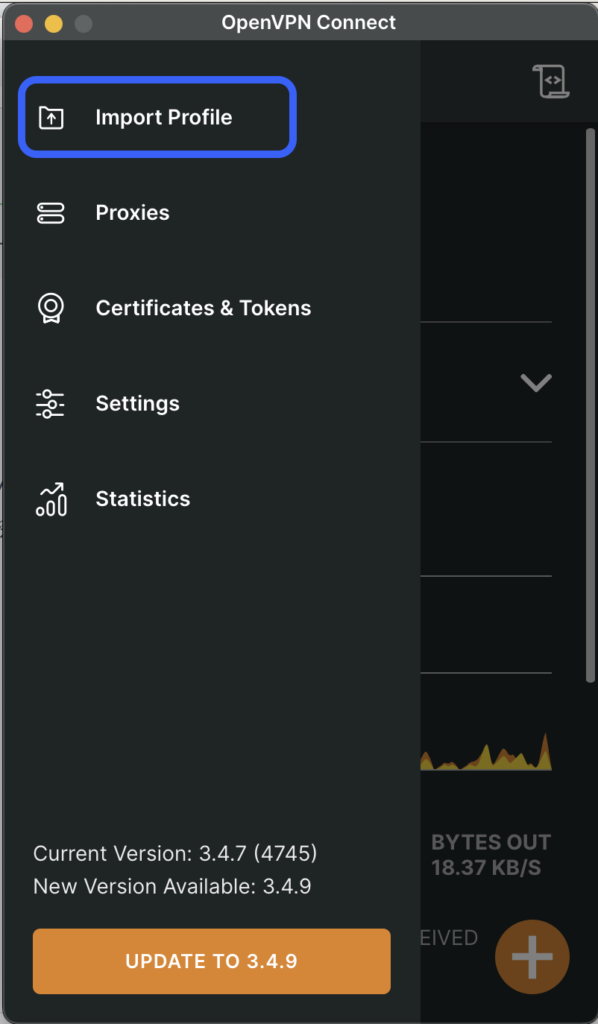
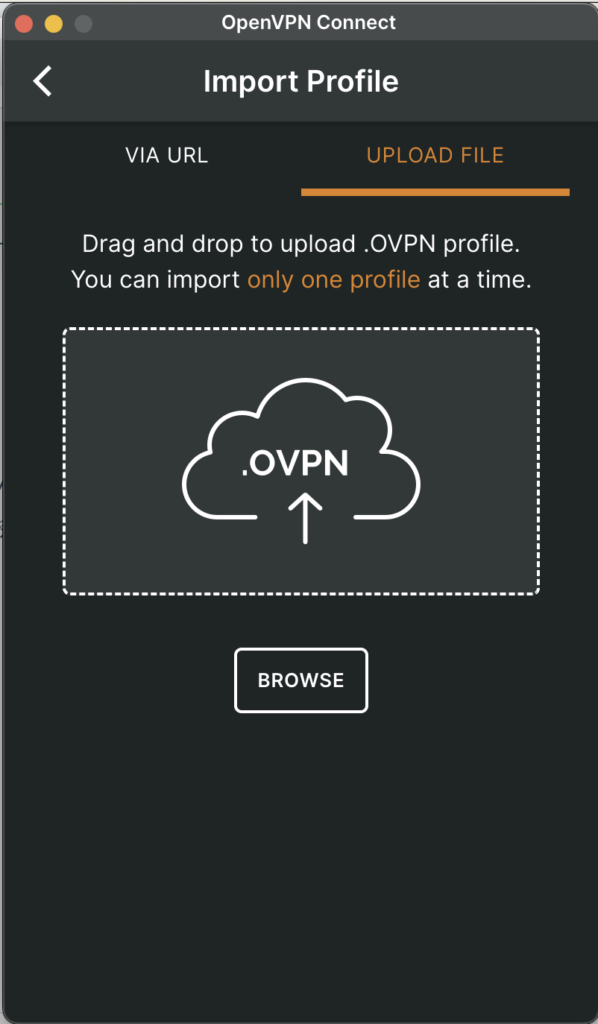
開啟軟體後先按下上角的選單 -> Import Profile,接著把檔案丟進去就大公告成了!
參考資料
HowTo:架設 OpenVPN 個體建立 Client-to-Site VPN 連線
PVE7.0 LXC容器开启TUN/TAP
[Proxmox VE 8.1.3] Unable to use TUN (/dev/net/tun) in Debian 12.2-1 container